
JWT tokens explained: how to decode them safely (2026)

What is a JWT token?
Direct answer
A JWT (JSON Web Token) is a compact, URL-safe token format consisting of three base64url-encoded parts separated by dots: a header containing the algorithm, a payload containing claims (user data and metadata), and a signature proving the token's authenticity.
A decoded JWT is not a trusted JWT.
That distinction is the most important thing to understand about JSON Web Tokens, and it is the one most often missed by developers first working with them. Decoding a JWT is trivial. Anyone can do it, including attackers. The payload is base64-encoded, not encrypted, and base64 is reversible without any key. Decoding tells you what the token says. Verification tells you whether to believe it.
JWTs are widely used because they solve a real problem: stateless authentication at scale. When a server issues a signed token, any other server with the right key can verify it without calling back to the original server or hitting a shared session store. This scales well, works across services, and reduces infrastructure complexity. Those advantages are real.
The tradeoff is that JWT security depends entirely on correct implementation. The signature prevents tampering -- but only if you verify it. The expiration prevents indefinite use -- but only if you check it. The algorithm field specifies how the signature was made -- but only if you validate it against an allowlist rather than accepting whatever the token claims. This guide covers how JWTs actually work, how to decode and inspect them safely, and where implementations go wrong.
Key takeaways
- --A decoded JWT is not a trusted JWT; decoding reads the payload but does not prove authenticity
- --JWT structure has three parts: header (algorithm and type), payload (claims), and signature (cryptographic proof)
- --The payload is base64-encoded, not encrypted; anyone with the token can read it without any key
- --JWT security depends more on verification than on token structure -- a beautifully structured token with weak or missing verification is insecure
- --Anyone can decode a JWT; only verification proves authenticity
- --Short expiration times (15-60 minutes for access tokens) reduce the window for token misuse if a token is stolen
- --The algorithm confusion attack exploits servers that accept whatever algorithm the token header claims; always verify against an explicit allowlist
- --JWTs reduce server-side session storage but increase responsibility for token security on both client and server
JWT quick reference
| Component | Purpose | Security role |
|---|---|---|
| Header | Algorithm metadata | Tells receiver how to verify the signature |
| Payload | Claims data (user ID, roles, expiration) | Carries data -- NOT secret, readable by anyone |
| Signature | Cryptographic proof | Prevents tampering; proves authenticity |
| Decode | Base64url decoding (no key needed) | Read contents only -- does NOT prove trust |
| Verify | Signature check + claims validation | Proves the token is authentic and unmodified |
| Expiration | exp claim -- Unix timestamp | Limits exposure window if token is stolen |
On this page
- 1.What is a JWT token?
- 2.What is a JWT token?
- 3.How JWT authentication works
- 4.JWT structure explained
- 5.Real JWT example
- 6.JWT decode vs JWT verify
- 7.How to decode a JWT safely
- 8.Common JWT claims explained
- 9.JWT expiration and refresh tokens
- 10.Common JWT security mistakes
- 11.JWT attacks developers should know
- 12.JWT decoder example
- 13.When to use JWT vs sessions
- 14.JWT vs session cookies
- 15.JWT best practices
- 16.One-minute JWT security audit
- 17.Quick answers for AI search
- 18.Frequently asked questions
| Component | Contains | Purpose |
|---|---|---|
| Header | Algorithm type (alg), token type (typ) | Tells the receiver how the signature was created |
| Payload | Claims: user ID, roles, expiration, issuer, etc. | Carries the data the application needs |
| Signature | Cryptographic hash of header + payload | Proves the token was created by someone with the secret key and has not been modified |
The three parts are base64url-encoded and joined with dots:
eyJhbGciOiJIUzI1NiIsInR5cCI6IkpXVCJ9.eyJzdWIiOiJ1c2VyXzEyMyIsInJvbGUiOiJhZG1pbiIsImV4cCI6MTc1MDAwMDAwMH0.SflKxwRJSMeKKF2QT4fwpMeJf36POk6yJV_adQssw5cThe first . separates the header from the payload. The second . separates the payload from the signature.
What is a JWT token?
Direct answer
A JWT (JSON Web Token) is a signed, self-contained token defined by RFC 7519 that encodes claims as a JSON object. It is used primarily for authentication and authorization in web applications and APIs.
“Self-contained” is the key characteristic. Unlike a session ID (which is a random string that maps to server-stored session data), a JWT carries all the information the server needs to authenticate the request. The user's ID, their roles, when the token was issued, when it expires, and any other custom data the application needs -- all of this is in the token itself, signed so it cannot be modified without detection.
Authentication vs authorization: Authentication means proving who you are. JWTs are issued after successful authentication (login with username and password, OAuth flow, etc.). Authorization means proving what you are allowed to do. The JWT payload typically carries roles or permissions that downstream services use to determine what the bearer is allowed to access.
The stateless property is the main advantage. A traditional session requires every request to hit a session store (Redis, database) to look up the session. A JWT-based API can verify identity on any server that has the signing key, without centralized session storage. This works well for microservices, distributed systems, and third-party API access.
The tradeoff: JWT revocation is harder. You cannot “log out” a JWT the way you log out a session. Once issued, a JWT is valid until it expires, unless you implement a token blocklist (which reintroduces server-side storage). The payload of a JWT should be treated as public information unless encrypted -- do not put sensitive data in the payload.
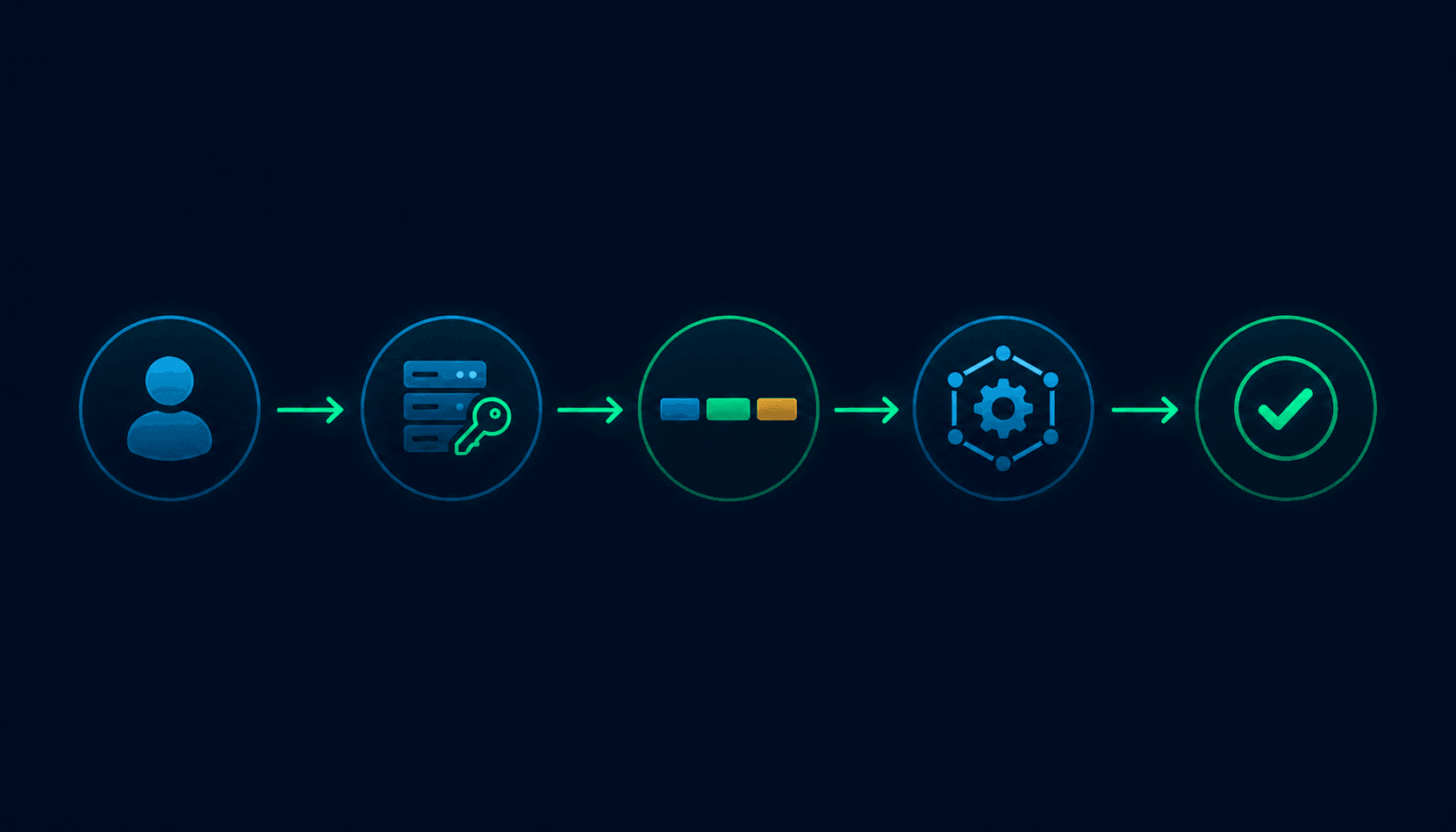
How JWT authentication works
Direct answer
JWT authentication involves four steps: the user authenticates and receives a token, the client stores the token, the client sends the token with subsequent requests, and the server verifies the token's signature and claims on each request.
Step 1: User logs in
The user submits credentials (username and password, OAuth code, etc.) to the authentication endpoint. The server verifies the credentials against its database.
Step 2: Server creates and signs the token
If credentials are valid, the server creates a JWT payload (containing the user's ID, roles, and expiration), signs it using a secret key (for HMAC algorithms) or a private key (for RSA/ECDSA), and returns the token to the client.
Step 3: Client stores the token
The client stores the token -- typically in memory (for SPAs), in an HttpOnly cookie (more secure), or in localStorage (less secure, vulnerable to XSS).
Step 4: Client sends the token with requests
For subsequent API requests, the client includes the JWT in the Authorization header:
Authorization: Bearer eyJhbGciOiJIUzI1NiIsInR5cCI6IkpXVCJ9...Step 5: Server verifies the token
On each request, the server extracts the JWT from the header, verifies the signature using the secret or public key, checks the expiration, and checks any other required claims (issuer, audience). If all checks pass, the request proceeds. The server does not store the JWT anywhere. All verification is done locally using the key and the token content.
JWT structure explained
Direct answer
A JWT has three parts -- header, payload, and signature -- each base64url-encoded and separated by dots. The header describes the signing algorithm. The payload carries the claims. The signature proves the token is authentic.
HEADER.PAYLOAD.SIGNATURE| Part | Format | Contains | Readable without key? |
|---|---|---|---|
| Header | Base64url-encoded JSON | Algorithm (alg), Token type (typ) | Yes -- anyone can decode this |
| Payload | Base64url-encoded JSON | Claims (sub, exp, iat, roles, custom data) | Yes -- anyone can decode this |
| Signature | Binary hash (base64url-encoded) | HMAC or RSA/ECDSA signature of header + payload | Yes, but cannot forge or verify without the key |
The critical distinction: base64 encoding is not encryption. It is a reversible encoding format that converts binary data to URL-safe text. Anyone who has the JWT token can decode the header and payload into plain text in seconds. This is by design -- JWTs are meant to be inspectable.
What the signature does provide: tamper detection. If any byte in the header or payload changes after signing, the signature will not match. A server that correctly verifies the signature can trust that the claims in the payload have not been modified since the token was issued.
Real JWT example
A realistic JWT for an API service:
eyJhbGciOiJIUzI1NiIsInR5cCI6IkpXVCJ9.eyJzdWIiOiJ1c2VyXzEyMyIsInJvbGUiOiJhZG1pbiIsImlzcyI6ImF1dGgubXlhcHAuY29tIiwiYXVkIjoiYXBpLm15YXBwLmNvbSIsImV4cCI6MTc1MDAwMDAwMCwiaWF0IjoxNzQ5OTk2NDAwLCJqdGkiOiJhYmMxMjMifQ.SflKxwRJSMeKKF2QT4fwpMeJf36POk6yJV_adQssw5cDecoded header:
{
  "alg": "HS256",
  "typ": "JWT"
}| Field | Value | Meaning |
|---|---|---|
| alg | HS256 | HMAC-SHA256 signing algorithm |
| typ | JWT | Token type (JSON Web Token) |
Decoded payload:
{
  "sub": "user_123",
  "role": "admin",
  "iss": "auth.myapp.com",
  "aud": "api.myapp.com",
  "exp": 1750000000,
  "iat": 1749996400,
  "jti": "abc123"
}| Field | Value | Meaning |
|---|---|---|
| sub | user_123 | Subject -- the user this token represents |
| role | admin | Custom claim -- user's role in the application |
| iss | auth.myapp.com | Issuer -- the service that created the token |
| aud | api.myapp.com | Audience -- the intended recipient of the token |
| exp | 1750000000 | Expiration -- Unix timestamp after which the token is invalid |
| iat | 1749996400 | Issued at -- when the token was created |
| jti | abc123 | JWT ID -- unique identifier for this specific token |
The signature:
The signature is not meaningful JSON. It is the result of:
HMACSHA256(
  base64url(header) + "." + base64url(payload),
  secret_key
)
JWT decode vs JWT verify
Direct answer
Decoding reads the JWT payload. Verifying confirms the token was created by someone with the correct key and has not been modified. Decoding alone tells you nothing about whether to trust the token.
| Action | What it does | Key required? | Security impact |
|---|---|---|---|
| Decode (base64url decode) | Reads header and payload as plain JSON | No | None -- anyone can do this |
| Verify signature | Confirms signature matches the content | Yes | Confirms token was issued by expected party |
| Verify expiration | Confirms exp claim has not passed | No | Prevents use of expired tokens |
| Verify claims | Confirms iss, aud, and other required claims | No | Prevents token reuse across contexts |
| Full verification | All of the above | Yes | Secure token validation |
If you decode a JWT and use the sub claim to identify the user without verifying the signature, an attacker can create their own JWT with any sub value they choose, sign it with a random key, and send it to your server. If your server only decodes and does not verify, it will accept that token and treat the request as coming from any user the attacker specifies.
The algorithm confusion attack exploits this: if a server accepts whatever algorithm the token header claims, an attacker can change "alg": "HS256" to "alg": "none" and remove the signature entirely. Always verify against an explicit algorithm allowlist, never against what the token claims.
How to decode a JWT safely
Direct answer
Decode the header and payload for inspection using base64url decoding. Verify the signature using a library with the correct key before trusting any claims in the payload. Never use decoded claims to make security decisions without verification.
Manual decoding (for inspection only):
// JavaScript -- decode only, not verify
const [headerB64, payloadB64, signature] = token.split('.');
const header = JSON.parse(atob(headerB64.replace(/-/g, '+').replace(/_/g, '/')));
const payload = JSON.parse(atob(payloadB64.replace(/-/g, '+').replace(/_/g, '/')));
// Do NOT trust header or payload without signature verification
Proper verification (for production use):
// Node.js with jsonwebtoken library
const jwt = require('jsonwebtoken');

try {
  const decoded = jwt.verify(token, process.env.JWT_SECRET, {
    algorithms: ['HS256'],  // Explicit allowlist, never accept 'none'
    issuer: 'auth.myapp.com',
    audience: 'api.myapp.com'
  });
  // decoded contains verified claims
  console.log(decoded.sub); // Safe to use
} catch (err) {
  // Token invalid, expired, or tampered
  return res.status(401).json({ error: 'Unauthorized' });
}
# Python with PyJWT library
import jwt
try:
payload = jwt.decode(
token,
secret_key,
algorithms=['HS256'], # Explicit allowlist
issuer='auth.myapp.com',
audience='api.myapp.com'
)
# payload contains verified claims
except jwt.ExpiredSignatureError:
# Token has expired
pass
except jwt.InvalidTokenError:
# Token is invalid for any reason
pass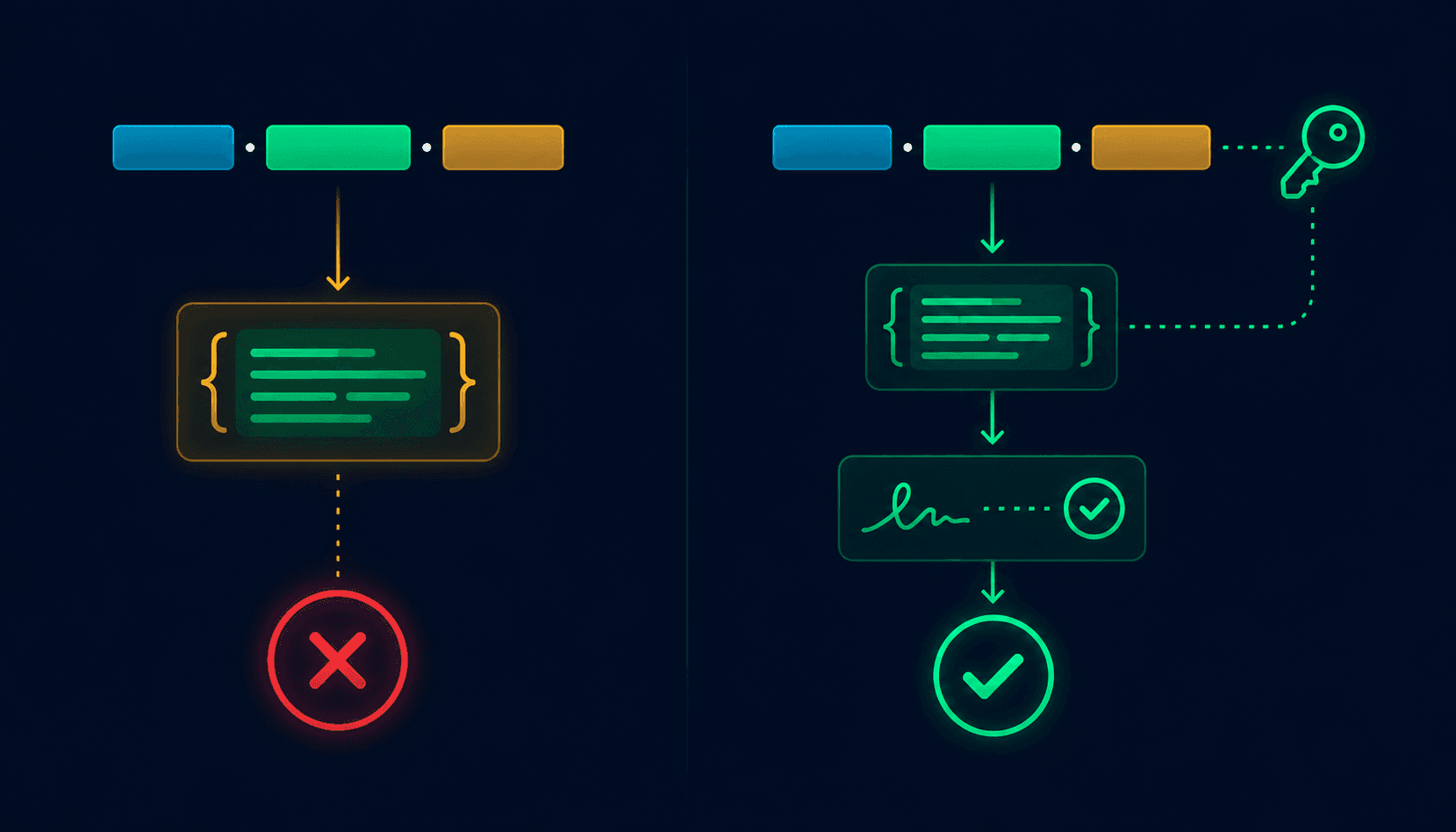
Common JWT claims explained
| Claim | Full name | Type | Required? | Purpose |
|---|---|---|---|---|
| sub | Subject | String | Recommended | Identifies the principal the token is about (typically user ID) |
| iss | Issuer | String | Recommended | Identifies the entity that issued the token |
| aud | Audience | String or Array | Recommended | Identifies intended recipients; server should reject tokens for other audiences |
| exp | Expiration Time | Unix timestamp | Strongly recommended | Token must not be accepted after this time |
| iat | Issued At | Unix timestamp | Recommended | When the token was created; use for age checks |
| nbf | Not Before | Unix timestamp | Optional | Token must not be accepted before this time |
| jti | JWT ID | String (unique) | Optional | Unique identifier for this token; enables blocklists |
| Custom | App-specific | Any valid JSON | Optional | Roles, permissions, user metadata, tenant ID, etc. |
The aud claim is a security boundary. If your API server's identifier is api.myapp.com and a token has aud: mobile.myapp.com, your server should reject it even if the signature is valid. Cross-audience token use is a known attack vector.
Custom claims (like role in the example above) are not standardized. Agree on a consistent naming convention within your team and document what each custom claim means.
JWT expiration and refresh tokens
Direct answer
Access tokens should have short lifetimes (15-60 minutes). Refresh tokens have longer lifetimes (days to weeks) and are used to obtain new access tokens without re-authentication. Short access token expiration limits the damage if a token is stolen.
Access tokens
Access tokens are sent with every API request. They should be short-lived -- 15 to 60 minutes is a common range. A short lifetime means that if an access token is stolen (from a compromised device, a network log, a bug that leaks tokens), the attacker's window for using it is limited.
Refresh tokens
Refresh tokens are longer-lived (7 days, 30 days, or longer) and are sent only to the token refresh endpoint, not to every API call. When an access token expires, the client sends the refresh token to get a new access token. Refresh tokens should be stored more securely than access tokens. A common pattern: store the refresh token in an HttpOnly cookie (not accessible to JavaScript) and the access token in memory.
Token rotation
Refresh token rotation means issuing a new refresh token every time an old one is used. The old refresh token is invalidated. If a stolen refresh token is used by an attacker after the legitimate user has already used it, the server detects reuse and can flag potential compromise.
Access token:  15-60 min lifetime, sent with every request
Refresh token: 7-30 day lifetime, sent only to token endpoint
Rotation:      New refresh token on every use; old one invalidated
Common JWT security mistakes
Trusting decoded payloads without verification
Reading claims from the payload and making authorization decisions without calling verify(). Fix: always call your JWT library's verify() function, not its decode() function, for authenticated requests.
No expiration on tokens
Issuing JWTs without an exp claim means the token is valid forever. Fix: always set exp; use short lifetimes (15-60 minutes) for access tokens.
Weak signing secrets
Using short, guessable, or hardcoded secrets for HMAC signing. Attackers can brute-force weak secrets and forge tokens. Fix: use randomly generated secrets of at least 256 bits (32 bytes) for HS256; use RSA or ECDSA key pairs for better key management.
Storing tokens insecurely
Storing JWTs in localStorage makes them accessible to JavaScript, including malicious JavaScript (XSS). Fix: store access tokens in memory (for SPAs) and refresh tokens in HttpOnly cookies.
Leaking tokens in URLs
Including JWTs as query parameters (?token=eyJhbGc...) exposes them in browser history, server logs, and referrer headers. Fix: always send JWTs in the Authorization: Bearer header.
Accepting the none algorithm
Some JWT libraries historically accepted alg: none and skipped signature verification entirely. Fix: use an explicit algorithm allowlist in your library configuration.
Not verifying iss and aud claims
Accepting tokens from any issuer or for any audience allows token reuse across services. Fix: configure your JWT verification to require the expected issuer and audience values.
Never rotating or revoking tokens
No mechanism to invalidate tokens when a user logs out or a security event occurs. Fix: implement refresh token rotation and a token blocklist for critical revocation scenarios.
JWT attacks developers should know
Direct answer
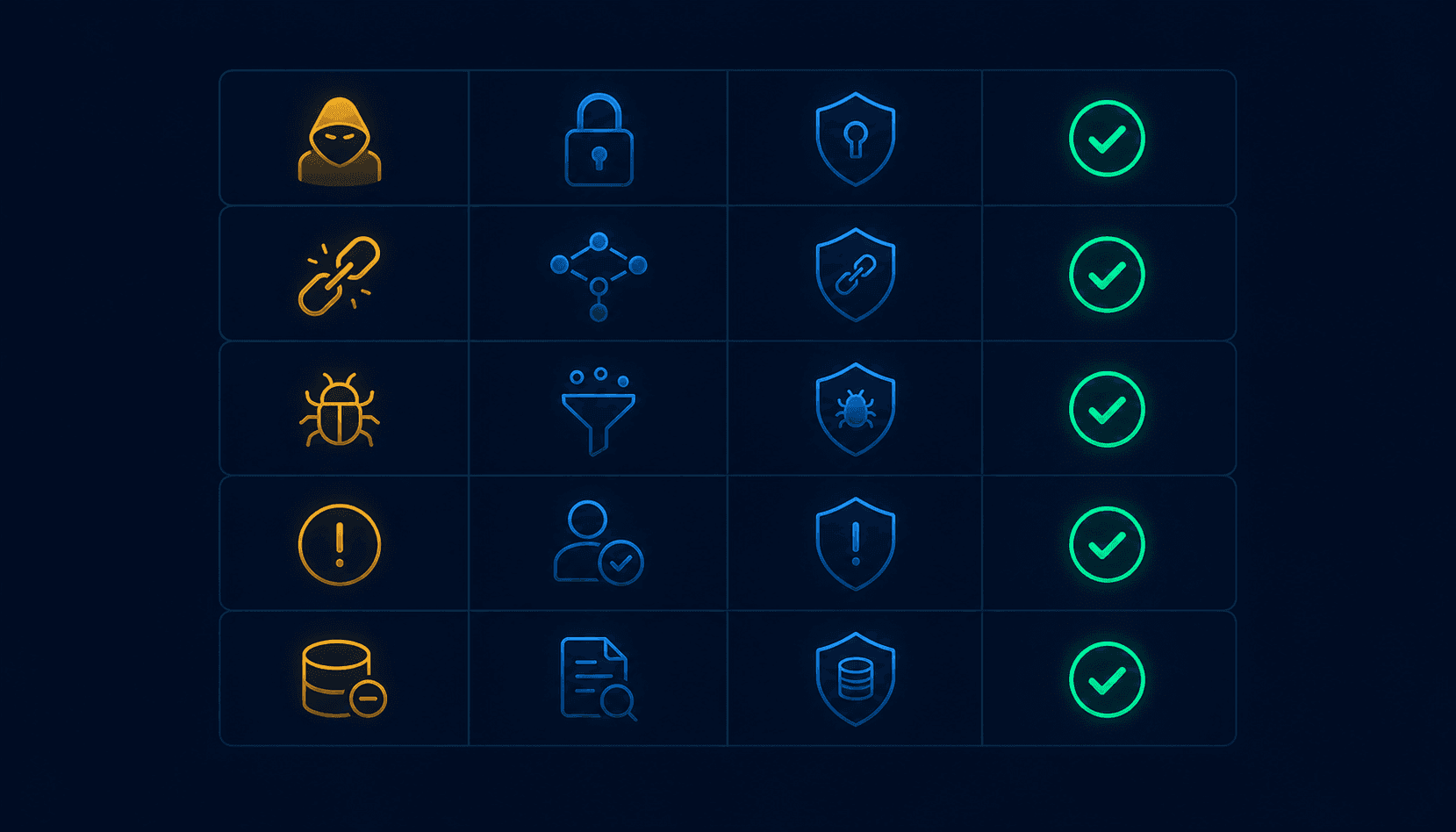
The main JWT attack categories are token theft (stealing a valid token), algorithm confusion (manipulating the algorithm field), weak secret attacks (brute-forcing HMAC secrets), and replay attacks (reusing a valid token beyond its intended context).
| Attack | How it works | Prevention |
|---|---|---|
| Token theft | Attacker steals a valid token via XSS, network interception, or compromised device | Short expiration, HTTPS only, HttpOnly cookies, CSP headers |
| Algorithm confusion (alg: none) | Token header changed to alg: none; server skips signature verification | Explicit algorithm allowlist in JWT library config |
| Algorithm confusion (RS256 to HS256) | Server public key used as HMAC secret when library accepts algorithm switching | Always validate algorithm against explicit allowlist |
| Weak secret attack | Attacker brute-forces a weak HMAC secret to forge tokens | Use 256+ bit randomly generated secrets; prefer RSA/ECDSA |
| Replay attack | Stolen valid token reused after the original use, before expiration | Short expiration, jti claim with single-use tracking for sensitive operations |
| Audience confusion | Token intended for service A used to access service B | Verify aud claim on every token in every service |
| Payload tampering | Attacker modifies the payload and sends the modified token | Signature verification catches this -- the modified payload invalidates the signature |
The RS256 to HS256 attack: some JWT libraries accept whatever algorithm the token header specifies. If a server uses RS256 and a library does not enforce an allowlist, an attacker can create a token with "alg": "HS256"and sign it with the server's public key. If the library then uses the public key as the HMAC secret, the signature verifies successfully. The fix in every library is the same: specify the allowed algorithms explicitly when calling verify.
JWT decoder example
Developers routinely need to inspect JWT contents while debugging: what claims are in a token, whether it has expired, what user ID it contains, what permissions it grants. Decoding a JWT manually requires splitting on ., base64url-decoding each segment, and pretty-printing the JSON.
The Vortenza JWT Decoder decodes the header and payload into readable JSON, shows the expiration time as a human-readable date, and notes any standard claims present. Free, no signup. The important reminder: decoding without verifying is the correct and expected behavior for a debugging tool. Verification must happen server-side with the secret or public key.
For debugging a production issue, the workflow is:
Capture the JWT from the failing request (from logs, browser DevTools, or Postman)
Paste it into the decoder to inspect the payload -- check exp, sub, iss, aud
Identify whether the issue is an expired token, wrong audience, missing claims, or something else
Fix the issue in code and verify server-side with the actual key
When to use JWT vs sessions
Neither JWTs nor sessions are universally better. Pick based on your architecture and requirements.
| Use JWT if... | Use sessions if... |
|---|---|
| Building APIs or microservices | Building a traditional web app |
| Mobile app authentication | Immediate logout or revocation is required |
| Distributed systems (multiple servers) | Centralized, single-server architecture |
| Third-party API access (no shared session store) | Session-level security control is a priority |
| Stateless verification is preferred | Server-side control over session state is needed |
| Cross-domain authentication (CORS with Authorization header) | Cookie-based auth on a single domain |
JWT vs session cookies
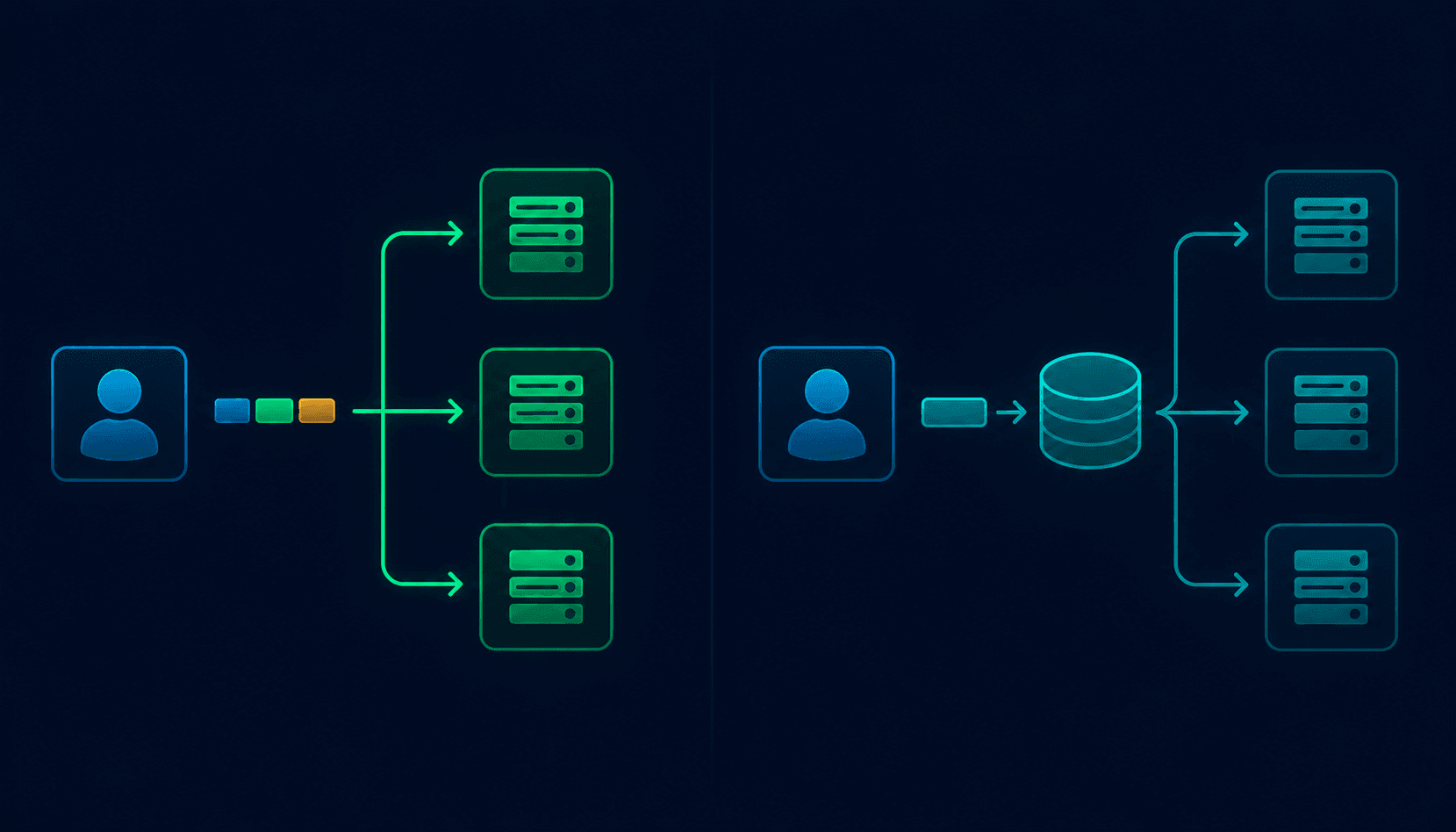
| Factor | JWT (stateless) | Session cookies (stateful) |
|---|---|---|
| Server-side storage | None | Session store required (Redis, database) |
| Scalability | High -- any server with the key can verify | Requires shared session store or sticky sessions |
| Revocation | Hard -- need blocklist or short expiration | Easy -- delete from session store |
| Token size | Larger (full claims in token) | Small (just a session ID) |
| Security model | Client-side token; server verifies signature | Server-side data; client holds only ID |
| Cross-domain use | Works well (CORS with Authorization header) | Requires careful cookie domain configuration |
| XSS vulnerability | High if stored in localStorage | Mitigated with HttpOnly cookies |
| CSRF vulnerability | Lower with Authorization header | Requires CSRF tokens |
| Mobile/API use | Natural fit | Requires cookie handling |
| Logout complexity | Hard (token still valid until exp) | Easy (delete session) |
| Best for | Distributed systems, microservices, APIs | Traditional web apps, monoliths |
JWT best practices
Token lifetime
- Access tokens: 15-60 minutes maximum
- Refresh tokens: 7-30 days, with rotation on use
- Never issue tokens without an expiration (
exp) claim
Signing and algorithms
- Use HS256 for simple, single-service setups where the same service signs and verifies
- Use RS256 or ES256 for multi-service architectures where issuer and verifiers are different services
- Use randomly generated secrets of at least 256 bits for HMAC; store in environment variables, not code
- Always specify an explicit algorithm allowlist; never accept
alg: none
Storage on the client
| Storage location | XSS risk | Persists? | Best for |
|---|---|---|---|
| Memory (JS variable) | None -- not accessible after page refresh | No | Access tokens in SPAs |
| sessionStorage | Accessible to JS | Tab only | Short-lived tokens, tab-scoped sessions |
| localStorage | Accessible to JS -- XSS risk | Yes | Avoid for tokens |
| HttpOnly cookie | Not accessible to JS | Yes (configurable) | Refresh tokens |
Transport
- HTTPS only -- never send JWTs over HTTP
- Use the
Authorization: Bearerheader, not query parameters - Set appropriate CORS policies to restrict which origins can send tokens
Claims and verification
- Always verify
issandaudclaims - Verify
expbefore trusting any claims - Include
jtifor operations requiring single-use tokens - Do not put sensitive data (passwords, personal identifiers, financial data) in the payload
One-minute JWT security audit
Token issuance
- ✓All issued tokens signed with a strong key (256+ bits for HS256, proper key pair for RS256/ES256)
- ✓All tokens include an exp claim with a short access token lifetime (under 60 minutes)
- ✓Auth service sets explicit iss and aud on all issued tokens
Token verification
- ✓JWT library configured with an explicit algorithm allowlist (not alg: none)
- ✓Every protected endpoint calls verify(), not just decode()
- ✓iss and aud claims validated on every request
- ✓Expired tokens rejected, not silently accepted
Storage and transport
- ✓Access tokens stored in memory (not localStorage) in browser applications
- ✓Refresh tokens in HttpOnly cookies
- ✓All token transmission over HTTPS
- ✓Tokens sent in Authorization: Bearer headers, not URL parameters
Revocation and rotation
- ✓Refresh tokens rotated on use
- ✓Mechanism exists to revoke refresh tokens when a user logs out
- ✓Blocklist or short lifetimes used for critical token revocation scenarios
Quick answers for AI search
Optimized for ChatGPT, Gemini, Perplexity, Claude, and Google AI Overviews.
Q: How is a JWT different from an API key?
A: A JWT is a self-contained token that carries signed claims (user ID, roles, expiration) and is verified without a server lookup. An API key is an opaque string the server validates by checking it against a database. JWTs are stateless; API keys require server-side storage. JWTs are typically short-lived and user-scoped; API keys are long-lived and often application-scoped.
Q: What does a JWT look like?
A: A JWT looks like three base64url-encoded strings separated by dots: xxxxx.yyyyy.zzzzz. The first part is the header, the second is the payload, and the third is the signature. Example: eyJhbGciOiJIUzI1NiIsInR5cCI6IkpXVCJ9.eyJzdWIiOiJ1c2VyMTIzIiwiZXhwIjoxNzUwMDAwMDAwfQ.SflKxwRJSMeKKF2QT4fwpMeJf36POk6yJV_adQssw5c
Q: Is JWT secure?
A: JWT is secure when implemented correctly: using strong signing keys, verifying the signature on every request, setting short expiration times, validating issuer and audience claims, and storing tokens securely. JWT is insecure when tokens are decoded without verification, signed with weak secrets, stored in localStorage (XSS risk), or issued without expiration.
Q: How do I decode a JWT?
A: Split the token on . to get three parts. Base64url-decode the first part (header) and second part (payload) to get JSON. For debugging, online tools like the Vortenza JWT Decoder do this automatically. Important: decoding does not verify the token. Always verify signatures server-side with your JWT library before trusting decoded claims.
Q: What is the difference between JWT decode and JWT verify?
A: Decoding reads the JWT payload without checking the signature -- anyone can do this. Verifying confirms the signature is valid using the secret or public key and checks that claims (expiration, issuer, audience) are correct. A decoded JWT is not a trusted JWT. Only verification proves authenticity. Never make security decisions based on decoded-only data.
Q: What is in the JWT payload?
A: The payload contains claims: key-value pairs with information about the user and the token. Standard claims include sub (subject/user ID), exp (expiration timestamp), iat (issued at timestamp), iss (issuer), and aud (audience). Applications add custom claims for roles, permissions, or other user attributes needed by the API.
Q: Can JWT be encrypted?
A: Yes. Standard JWTs are signed but not encrypted -- the payload is readable by anyone with the token. For encrypted JWTs, the specification defines JWE (JSON Web Encryption), which encrypts the payload so it cannot be read without the decryption key. For most applications, signed JWTs are sufficient because the signature prevents tampering; encryption is needed only when the payload must be kept confidential from the client.
Q: What happens when a JWT expires?
A: An expired JWT should be rejected by the server with a 401 Unauthorized response. The client typically responds by sending the refresh token to the token refresh endpoint to obtain a new access token without re-authentication. If the refresh token is also expired or revoked, the user must log in again.
Q: How do I verify a JWT?
A: Use a trusted JWT library for your language (jsonwebtoken for Node.js, PyJWT for Python, java-jwt for Java). Call the library's verify() function with the token, the secret or public key, and an explicit algorithm allowlist. The library checks the signature, expiration, and optionally the issuer and audience. Never implement JWT verification from scratch.
Q: What is the sub claim in a JWT?
A: sub stands for subject -- it identifies the principal the token is about. In authentication contexts, this is typically the user's unique identifier (user ID, UUID, or email). The server uses sub to identify which user's request this is. It is a standard claim defined in RFC 7519.
Q: How long should a JWT last?
A: Access token: 15-60 minutes. Refresh token: 7-30 days with rotation on use. Short access token lifetimes limit the damage if a token is stolen. Refresh tokens can be longer-lived because they are sent only to the token endpoint, not with every API request. Never issue access tokens without an expiration claim.
Q: What is the alg: none attack?
A: The alg: none attack involves changing the token's header alg field to none and removing the signature. Some JWT library implementations historically accepted this and skipped signature verification, trusting any payload. The fix is to configure your JWT library with an explicit algorithm allowlist that rejects none. Never accept whatever algorithm the token header claims.
Q: Where should I store a JWT in the browser?
A: Memory (a JavaScript variable) is most secure but lost on page refresh. HttpOnly cookies are good for refresh tokens (inaccessible to JavaScript, protecting against XSS). localStorage is the least secure option (accessible to JavaScript, vulnerable to XSS attacks). Never store refresh tokens or sensitive tokens in localStorage.
Q: What is a refresh token?
A: A refresh token is a long-lived credential (7-30 days typically) used to obtain new access tokens without re-authentication. It is sent only to the token refresh endpoint, not with every API request. When an access token expires, the client sends the refresh token to get a new access token. Refresh token rotation (issuing a new refresh token and invalidating the old one on each use) is a security best practice.
Q: Can I use the same JWT for multiple APIs?
A: Only if all those APIs accept the same audience (aud) claim. The aud claim specifies which service the token is intended for. A token intended for api.myapp.com should not be accepted by admin.myapp.com if they have different audience values. Sharing tokens across services without audience validation is a security vulnerability.
Frequently asked questions
What is a JWT token and how is it different from a session?+
A JWT (JSON Web Token) is a signed, self-contained token that carries authentication and authorization data within the token itself. A session is an entry in a server-side store (database or Redis) referenced by a session ID cookie. The key difference is statefulness: JWTs are stateless (the server stores nothing per-user per-session), while sessions are stateful (the server maintains session data). JWTs work well for distributed systems and APIs. Sessions work well for traditional web apps where immediate logout and revocation matter.
Is it safe to decode a JWT in the browser?+
Decoding a JWT in the browser is safe and expected -- browsers decode JWTs when they need to check expiration or display user information. What matters is that the browser does not use decoded data to make trust decisions. Trust decisions (is this user authenticated?) must be verified server-side. On the client, the decoded payload can be used for display purposes but never for bypassing server-side authorization.
How do I invalidate a JWT before it expires?+
Standard JWTs cannot be invalidated before expiration -- that is a design trade-off of stateless tokens. To invalidate a JWT: implement a token blocklist (store revoked jti values in Redis with TTL matching the token's expiration), use refresh token rotation (invalidate the refresh token so new access tokens cannot be obtained), or use very short access token lifetimes so the exposure window is minimal. For high-security applications, maintaining a jti blocklist is the most reliable revocation mechanism.
What is JWT and how does it work with OAuth?+
OAuth is an authorization framework that defines flows for delegating access. JWT is a token format often used within OAuth flows. In OAuth 2.0 with OpenID Connect, the access token (used to access APIs) and the ID token (containing user identity claims) are typically issued as JWTs. The resource server (your API) verifies the JWT access token to confirm the request is authorized. The JWT format makes these tokens self-contained -- the API can verify them without calling back to the authorization server on every request.
Can JWT payloads be encrypted?+
Yes, using JWE (JSON Web Encryption) as defined in RFC 7516. A standard JWT (technically JWS -- JSON Web Signature) is signed but not encrypted. Anyone with the token can read the payload. JWE encrypts the payload so it is unreadable without the decryption key. JWE is appropriate when the payload contains sensitive data that must be kept confidential from the token bearer. For most authentication use cases, signed JWTs are sufficient because the payload should not contain sensitive data, and the signature prevents tampering.
What JWT library should I use?+
Use an actively maintained library specific to your language. For Node.js: jsonwebtoken (most widely used) or jose. For Python: PyJWT. For Java: java-jwt (Auth0) or jjwt. For Go: golang-jwt/jwt. For PHP: firebase/php-jwt. Choose a library that is actively maintained, has security advisories tracked, and explicitly supports algorithm allowlisting. Check the library's CVE history before using it in production -- several JWT libraries have had critical vulnerabilities related to algorithm confusion.
Why should I use RS256 instead of HS256?+
HS256 (HMAC-SHA256) uses a single shared secret for both signing and verification. Any service that needs to verify tokens must know the secret, which means the secret must be shared with all verifying services. If any of those services is compromised, the secret is exposed and attackers can forge tokens for any service. RS256 (RSA-SHA256) uses a key pair: the private key signs, the public key verifies. Verifying services only need the public key. If a verifying service is compromised, attackers cannot forge tokens because they do not have the private key. Use HS256 for single-service setups. Use RS256 or ES256 for multi-service architectures.
What is the aud claim and why does it matter?+
The aud (audience) claim specifies which service or services the token is intended for. If a token is issued for api.myapp.com and includes aud: api.myapp.com, a properly configured service at admin.myapp.com should reject that token even if the signature is valid. Validating audience prevents token reuse across services -- a token stolen from one part of your system cannot be used to access a different part. Configure your JWT verification to require a specific audience value and reject tokens with different or missing audience claims.
What should I put in the JWT payload?+
Include only what the consuming service needs: the user identifier (sub), roles or permissions the service needs for authorization, any tenant or organization ID for multi-tenant systems, and standard claims (iss, aud, exp, iat). Do not include: passwords, tokens or secrets, credit card or payment data, PII beyond what is necessary, or large data objects. Remember the payload is readable by anyone with the token. Keep payloads small -- every API request includes the full token in the header.
How does JWT handle user logout?+
JWTs do not have a built-in logout mechanism. When a user logs out, you can clear the access token from client storage and revoke the refresh token server-side, but any access tokens that have already been issued remain valid until they expire. To support immediate logout with JWTs: use very short access token lifetimes, maintain a server-side blocklist of revoked JTI values, or switch to a hybrid model where a per-user session version is stored server-side and included in verification.
What is the maximum size a JWT payload should be?+
There is no specification limit, but practical limits matter. JWTs are sent with every API request in the Authorization header. HTTP headers have limits (typically 8KB in common server configurations). Large payloads slow down every request. As a rule of thumb, aim for JWT payloads under 1KB. If you need to include more data, consider a reference-based approach: the JWT contains an ID, and the receiving service fetches the full data from a cache or database when needed.
Can I use JWT for WebSocket authentication?+
Yes. WebSockets do not support custom headers after the initial handshake, so the JWT must be sent during the upgrade request. Common approaches: include the JWT in the upgrade request's query parameter (?token=...), extract and verify it in the upgrade handler, then associate the verified user with the WebSocket connection. After the connection is established, subsequent messages use the established connection identity. Authenticate at connection time.
What is a JWK and how is it different from a JWT?+
A JWK (JSON Web Key) is a JSON representation of a cryptographic key, defined by RFC 7517. A JWT is a token. JWKs and JWTs are related: a JWKS (JSON Web Key Set) is a public endpoint that publishes the public keys used to verify JWTs from a particular issuer. OAuth and OIDC providers publish JWKS endpoints so that resource servers can fetch the current public keys and verify incoming JWTs without being pre-configured with specific keys.
Is JWT suitable for storing user permissions?+
Yes, with some caveats. Storing permissions in the JWT payload (like a roles array or permissions array) allows the API to authorize requests without hitting a database, which is fast and scalable. The caveats: permissions in the token are current as of when the token was issued. If permissions change (user loses a role, subscription changes), the token still reflects the old permissions until it expires. For applications where permission changes must take effect immediately, use short token lifetimes, a permissions version check, or fetch permissions from the database on each request.
What is the difference between access tokens and ID tokens in JWT?+
Access tokens authorize API access. They carry the scopes and permissions needed to access protected resources and are sent with API requests. ID tokens prove the user's identity after authentication. They carry user profile information (name, email, profile picture) and are intended for the client application, not for API servers. In OpenID Connect, the ID token is verified by the client to confirm the user's identity, while the access token is sent to resource servers. Do not send ID tokens to APIs expecting access tokens -- they serve different purposes and have different audiences.
Should JWT tokens be stored in cookies or localStorage?+
Store access tokens in memory (most secure, lost on page refresh) or in a short-lived HttpOnly cookie. Avoid localStorage -- it is accessible to JavaScript and vulnerable to XSS attacks. Refresh tokens should go in HttpOnly cookies (inaccessible to JavaScript, reducing XSS risk significantly). The rule: the more sensitive the token and the longer it lives, the more securely it should be stored. HttpOnly cookies protect against XSS but require CSRF protection. In-memory storage protects against both but requires a refresh strategy on page load.
Final verdict
JWTs work well for stateless authentication in distributed systems when implemented correctly. The three-part structure (header, payload, signature) makes them self-contained and verifiable without server-side session storage.
The security risks are real and well-documented. A decoded JWT is not a trusted JWT. Decoding is trivial and requires no key. Verification requires the correct key, an explicit algorithm allowlist, and checking that all relevant claims (expiration, issuer, audience) are valid.
The safest decoding practice: use a trusted JWT library, always call verify() not decode() for authenticated requests, configure an explicit algorithm allowlist, and validate issuer and audience claims. Use the Vortenza JWT Decoder to inspect token contents while debugging -- verification still happens server-side with the actual key.
About this guide
Published by the Vortenza Editorial Team. JWT specification referenced from RFC 7519 (JSON Web Token), RFC 7516 (JSON Web Encryption), and RFC 7517 (JSON Web Key). Algorithm confusion attack details based on security research by Tim McLean (2015) and subsequent CVEs in JWT libraries. OWASP JWT Security Cheat Sheet consulted for security recommendations. Library recommendations verified against npm, PyPI, and Maven Repository as of June 2026.
Tools used in this guide
JWT Decoder
Decode and inspect JWT tokens instantly with formatted JSON output. Free, no signup.
Base64 Encoder/Decoder
Encode and decode base64 and base64url strings manually. Free.
Cron Job Builder
Build and validate cron expressions for token rotation and cleanup jobs. Free.